iOS
iOS

Cybersecurity researchers have taken a close look at the inner workings of the Predator spyware, developed by the Cyprus-based company Intellexa. Rather than focusing on how the spyware initially infects a device, this latest research zooms in on how the malware behaves once a device has already been compromised.
The most fascinating discovery involves the mechanisms the Trojan uses to hide iOS camera and microphone indicators. By doing so, it can covertly spy on the infected user. In today’s post, we break down what Predator spyware actually is, how the iOS indicator system is designed to work, and how this malware manages to disable these indicators.
What Predator is, how it works, and what… Alien has to do with it
We previously took a deep dive into the most notorious commercial spyware out there in a dedicated feature — where we discussed the star of today’s post, Predator, among the others. You can check out that earlier post for a detailed review of this spyware, but for now, here’s a quick refresher on the essentials.
Predator was originally developed by a North Macedonian company named Cytrox. It was later acquired by the aforementioned Intellexa, a Cyprus-registered firm owned by a former Israeli intelligence officer — a truly international spy games collaboration.
Strictly speaking, Predator is the second half of a spyware duo designed to monitor iOS and Android users. The first component is named Alien; it’s responsible for compromising a device and installing Predator. As you might’ve guessed, these pieces of malware are named after the famous Alien vs. Predator franchise.
An attack using Intellexa’s software typically begins with a message containing a malicious link. When the victim clicks it, they’re directed to a site that leverages a chain of browser and OS vulnerabilities to infect the device. To keep things looking normal and avoid raising suspicion, the user is then redirected to a legitimate website.
Besides Alien, Intellexa offers several other delivery vehicles for landing Predator on a target’s device. These include the Mars and Jupiter systems, which are installed on the service provider’s side to infect devices through a man-in-the-middle attack.
Predator spyware for iOS comes packed with a wide array of surveillance tools. Most notably, it can record and transmit data from the device’s camera and microphone. Naturally, to keep the user from catching on to this suspicious activity, the system’s built-in recording indicators — the green and orange dots at the top of the screen — must be disabled. While it’s been known for some time that Predator could somehow hide these alerts, it’s only thanks to this research that we know how exactly it pulls it off.
How the iOS camera and microphone indicator system works
To understand how Predator disables these indicators, we first need to look at how iOS handles them. Since the release of iOS 14 in 2020, Apple devices have alerted users whenever the microphone or camera is active by displaying an orange or green dot at the top of the screen. If both are running simultaneously, only the green dot is shown.
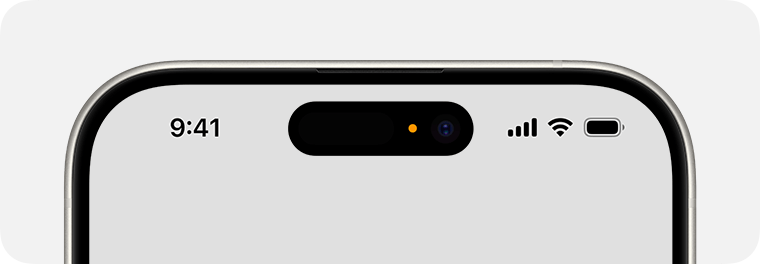
In iOS 14 and later, an orange dot appears at the top of the screen when the microphone is in use. Source
Just like other iOS user interface elements, recording indicators are managed by a process called SpringBoard, which is responsible for the device’s system-wide UI. When an app starts using the camera or microphone, the system registers the change in that specific module’s state. This activity data is then gathered by an internal system component, which passes the information to SpringBoard for processing. Once SpringBoard receives word that the camera or microphone is active, it toggles the green or orange dot on or off based on that data.
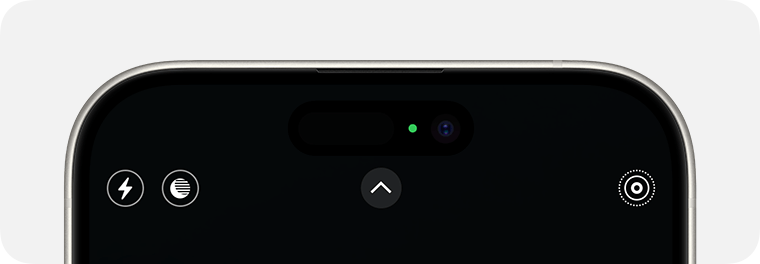
If the camera is in use (or both the camera and microphone are), a green dot appears. Source
From an app’s perspective, the process works like this: first, the app requests permission to access the camera or microphone through the standard iOS permission mechanism. When the app actually needs to use one or both of these modules, it calls the iOS system API. If the user has granted permission, iOS activates the requested module and automatically updates the status indicator. These indicators are strictly controlled by the operating system; third-party apps have no direct access to them.
How Predator interferes with the iOS camera and microphone indicators
Cybersecurity researchers analyzed a captured version of Predator and uncovered traces of multiple techniques used by the spyware’s creators to bypass built-in iOS mechanisms and disable recording indicators.
In the first approach — which appears to have been used during early development — the malware attempted to interfere with the indicators at the display stage right after SpringBoard received word that the camera or microphone was active. However, this method was likely deemed too complex and unreliable by the developers. As a result, this specific function remains in the Trojan as dead code — it’s never actually executed.
Ultimately, Predator settled on a simpler, more effective method that operates at the very level where the system receives data about the camera or microphone being turned on. To do this, Predator intercepts the communication between SpringBoard and the specific component responsible for collecting activity data from these modules.
By exploiting the specific characteristics of Objective-C — the programming language used to write the SpringBoard application — the malware completely blocks the signals indicating that the camera or microphone has been activated. As a result, SpringBoard never receives the signal that the module’s status has changed, so it never triggers the recording indicators.
How to lower your risk of spyware infection
Predator-grade spyware is quite expensive, and typically reserved for high-stakes industrial or state-sponsored espionage. On one hand, this means defending against such a high-tier threat is difficult — and achieving 100% protection is likely impossible. On the other hand, for these same reasons, the average user is statistically unlikely to be targeted.
However, if you’ve reason to believe you’re at risk from Predator or Pegasus-class spyware, here are a few steps you can take to make an attacker’s job much harder:
- Don’t click suspicious links from unknown senders.
- Regularly update your operating system, browsers, and messaging apps.
- Reboot your device occasionally. A simple restart can often help “lose the tail”, forcing attackers to reinfect the device from scratch.
- Install a reliable security solution on all the devices you use.
For a deeper dive into staying safe, check out security expert Costin Raiu’s post: Staying safe from Pegasus, Chrysaor and other APT mobile malware.
Curious about other ways your smartphone might be used to spy on you? Check out our related posts: