Data exfiltration happens when sensitive information is stolen from a system or account. It can occur quietly through malware. It can also result from compromised accounts or misused access. Understanding how data leaves your control is the first step toward preventing loss and protecting personal or business information. Data exfiltration does not always involve malware, attackers can also steal data using compromised accounts or normal tools.
What you need to know:
- Data exfiltration is the unauthorized transfer of data out of a system or account.
- It often involves stolen credentials or misuse of legitimate access.
- The key risk is not just exposure, but data being copied or moved elsewhere.
- Data leaks are usually accidental. Exfiltration is typically intentional.
- Monitoring unusual activity and limiting access can help reduce the risk.
What is data exfiltration in cybersecurity?
Data exfiltration is the unauthorized transfer or theft of data from a device or network. The defining feature is that the data is removed from its original location without permission.
If an attacker gains access to an email account and downloads contact lists or financial records, that information has been exfiltrated. The damage occurs because the data is no longer under the owner’s control and can be shared and even sold.
How is data exfiltration different from a data leak?
Data exfiltration usually involves intentional theft. Attackers or insiders deliberately move data out of a system to use for things like financial gain or espionage.
A data leak is typically accidental. This might happen when files are shared publicly by mistake. It can also happen when mismanaged storage exposes information or sensitive data is sent to the wrong recipient.
The result is the same for users: the data is no longer under your control. The difference lies in the cause. Deliberate removal versus unintended exposure.
How does data exfiltration happen?
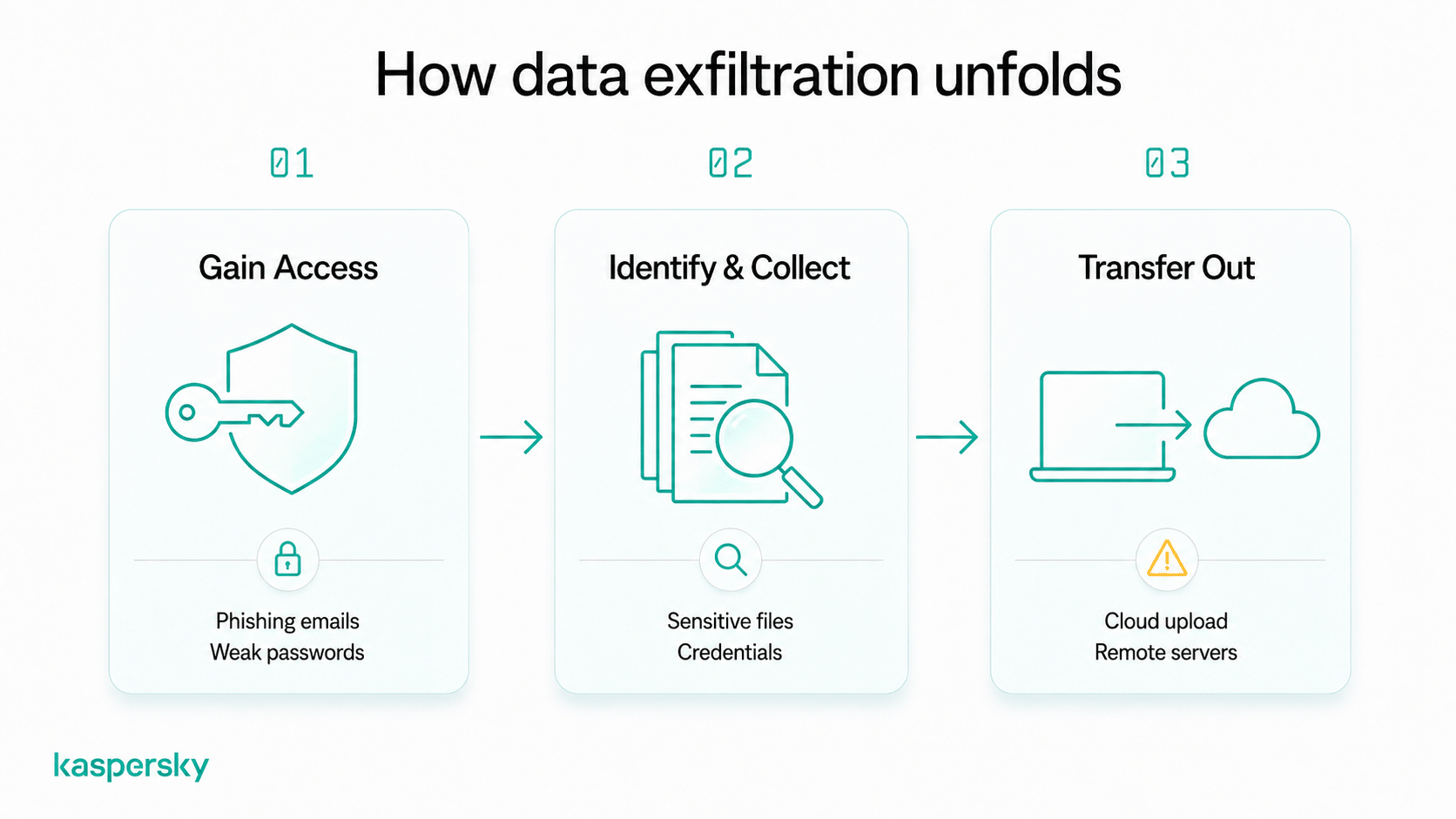
Data exfiltration usually follows a pattern. An attacker initially gains unauthorized access to a system or account. They then identify and collect valuable data. They then transfer that data to another location where it can be used or sold.
This process does not always require advanced hacking tools. Many incidents begin with everyday mistakes like clicking a phishing link or reusing a weak password. Some attackers use compromised accounts or built-in tools to move data quietly without installing malware. This can make data exfiltration indicators difficult to spot.
How do attackers gain access to data?
Most attacks start with methods designed to trick users rather than break technical defenses. Phishing emails may contain links to fake login pages that capture usernames and passwords. Malicious downloads can install spyware that monitors activity or steals files.
Weak or reused passwords also make accounts easier to compromise. Once attackers gain access to an email account or a cloud system, they can begin searching for sensitive information.
How do attackers move data out of a system?
Attackers transfer the data they have taken to an external location they control. This often involves uploading files to cloud storage services or sending them to remote servers.
Attackers may use encrypted connections or legitimate tools already available on the system. Because these methods can resemble normal activity, data exfiltration can continue for long periods without detection.
What types of data are targeted in data exfiltration?
Attackers usually focus on data that can be used for financial gain or identity theft. The more valuable or reusable the information is, the more attractive it becomes.
Common targets include passwords, financial account details, and personally identifiable information (PII) such as names, addresses, and identification numbers. Attackers may also seek files containing contracts, customer records, or confidential business information.
Both individuals and organizations are affected. Stolen login credentials can be reused to access multiple accounts. Leaked business data can be sold or exploited for competitive advantage or fraudulent activity.
What does data exfiltration look like in real life?
Data exfiltration often happens in the background and can resemble normal activity. The following examples show how it can occur in everyday situations.
- A compromised email account automatically forwards attachments and messages to an attacker without the user noticing.
- Malware on a laptop collects saved passwords from the browser and sends them to a remote server.
- A stolen cloud account login allows someone to download personal files or sensitive documents from online storage.
What are the warning signs of data exfiltration?
Knowing how to detect data exfiltration is not always easy. But there are practical signs that something unusual may be happening. These indicators often appear as unexpected account or device activity rather than obvious technical alerts.
Look for patterns like these:
- Unfamiliar logins from new locations or devices
- Unknown devices connected to your account or network
- Large or repeated file transfers you did not initiate
- Sudden password reset notifications or security alerts
- Unusual account behavior, such as missing files or changed settings
- Unexpected spikes in data usage on a device or internet connection
- Emails or messages sent without your knowledge
Seeing one of these signs does not always mean data exfiltration has occurred, but repeated or unexplained activity should be investigated.
What happens to stolen data after exfiltration?
Attackers rarely leave stolen data unused. Stolen information is typically monetized or shared with other criminals.
This can lead to unauthorized transactions or identity theft. For businesses, it can disrupt operations, damage customer trust, and lead to legal or compliance issues. The impact depends on the type of data stolen and how it is used.
How do attackers use stolen data?
Attackers often use stolen data to commit fraud or gain further access to accounts. Stolen login credentials can be reused to take control of banking or social media accounts.
Data is also regularly sold on underground markets or used as leverage for extortion. Attackers may threaten to release sensitive files unless payment is made.
What risks do victims face?
Victims may experience financial loss, privacy exposure, or reputational damage if personal or business information is misused.
Some risks can persist over time. Stolen credentials or personal data remain relevant to hackers and fraudsters. It may be reused months or years later and lead to ongoing account compromise or repeated fraud attempts.
How can you prevent data exfiltration?
Preventing data exfiltration starts with controlling access and staying alert to suspicious activity. Most incidents rely on simple weaknesses. Things like weak passwords and outdated software can give a route in.
Practical steps you can take include:
- Use strong, unique passwords for each account and store them in a password manager
- Enable multi-factor authentication (MFA) to add an extra layer of protection
- Be cautious with links and downloads, especially in unexpected emails or messages
- Keep devices and apps updated so security vulnerabilities are patched quickly
- Limit access to sensitive files by sharing only what is necessary
- Use secure file-sharing methods such as trusted cloud services with access controls
- Review account permissions regularly and remove access you no longer need
These habits reduce the chances that attackers can gain entry or move data unnoticed.
Protect your privacy
Kaspersky Premium offers various tools designed to protect your devices, monitor for your data being used or sold online, and keep your activity private.
Try Premium for FreeWhat should you do if you suspect data exfiltration?
Act quickly but stay calm if you suspect your data has been exfiltrated. Early action can limit damage and prevent further access.
Follow these steps:
- Change passwords immediately, starting with email and critical accounts
- Enable or confirm MFA on important services
- Review recent account activity for unfamiliar logins or downloads
- Secure affected devices by running a security scan or updating software
- Monitor financial and online accounts for unusual transactions or changes
- Contact relevant services or providers if sensitive data or payment information may be involved
Documenting what happened can also help support recovery and reporting if needed.
Why is data exfiltration becoming more common?
Data exfiltration is increasing because stolen information from data breaches has become easier to monetize. Attackers can sell data or combine it with ransomware attacks to pressure victims into paying.
The growth of cloud storage and connected services has also created more opportunities for data to move between systems. These tools improve convenience. However, they also expand the number of places where data can be accessed and potentially stolen.
Related Articles:
- What are the implications of accepting cookies on your privacy?
- What are the key concerns regarding social media privacy today?
- What is cybercrime and how does it relate to data exfiltration?
- What are the risks of Advanced Persistent Threats in data exfiltration?
Related Products:
FAQs
Can data exfiltration happen without hacking?
Yes. Data exfiltration can occur without traditional hacking. For example, attackers may use stolen passwords, compromised accounts, or misconfigured cloud settings to access and download data using normal tools.
Which devices are most at risk of data exfiltration?
Any device that stores or accesses sensitive data can be at risk. Devices connected to the internet or shared between users typically face higher exposure.
Can encrypted data still be exfiltrated?
Yes. Encryption protects data from being read without the correct key but attackers can still copy or transfer encrypted files. If they later obtain the key or password, the data may become accessible.
How do attackers avoid detection during data exfiltration?
Attackers often use methods that resemble normal activity, such as uploading files through legitimate services or transferring data in small amounts over time. They may also use encrypted connections to hide the content of the transfer.