cameras


Today, in most countries around the world, virtually every reasonably large city is packed with video cameras. On the one hand, the idea, of course, is to “keep us safe”: to monitor security in the streets, improve road safety and enforce traffic rules, and so on. But there’s the other side of the coin — ubiquitous video surveillance creates both privacy risks and opportunities for unauthorized surveillance We’ve repeatedly posted on our blog about how to protect yourself from surveillance involving IP cameras.
There’s another problem, too: relying too heavily on video surveillance systems can also be dangerous. If your cameras aren’t adequately cyber-secure, attackers may be able to disable them remotely to be able to then enter physical areas supposedly protected by video surveillance without being detected. This issue is especially relevant to home and privately managed surveillance systems — large companies generally do a better job of securing their devices (although there are exceptions there as well).
Disabling or replacing a camera feed is an almost obligatory plot device in heist movies. But unfortunately, this isn’t just a screenwriter’s invention: our recent research uncovered a vulnerability that makes it possible to remotely disable IP cameras made by Intelbras — a popular camera manufacturer. Read on to learn what the problem is, and how to protect your surveillance systems; a detailed technical analysis of the vulnerability is available on our expert blog, Securelist.
When an update does more harm than good
A surveillance camera is essentially a fully-fledged mini-computer, and its firmware needs to be updated regularly. In this case, however, the vulnerability was hidden in the firmware update procedure itself.
Intelbras provides firmware update files on its official website. The firmware can be updated manually from an SD card, or over the local network via the web interface or mobile app. However, during a firmware update, the camera neither required (past tense; a patch has since been issued – see below) authentication nor validated the firmware file before starting the update. As a result, anyone connected to the same Wi-Fi network as the camera could send it an update request. When an update is initiated, the camera reboots, taking it offline for about a minute before it becomes available again. But if the requests are sent repeatedly in a loop, the camera can be kept offline indefinitely.
We investigated this vulnerability on an Intelbras iM3 C (iM3B-C) camera running firmware version v240927 — the latest available at the time of our research. The iM3 C is a smart Full-HD Wi-Fi camera designed for both home surveillance and as a baby monitor. According to Intelbras, the firmware for the iM3 C is also compatible with the iMX C, iM4 C, iM5 SC, iME 360 C, and iM7+ FC models.
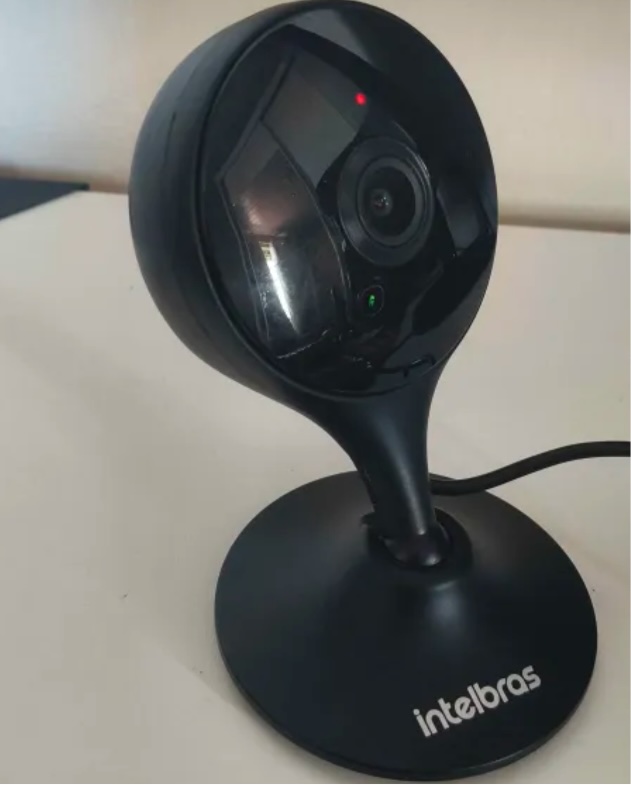
Intelbras iM3 C smart Wi-Fi camera used for the investigation. Its firmware is also compatible with the iMX C, iM4 C, iM5 SC, iME 360 C, and iM7+ FC models. Source
This vulnerability has a medium severity rating. However, because of the large number of potentially affected users, the impact of successful exploitation could be significant. Intelbras Mibo Smart — Intelbras’s app for setting up and managing these camera models — has been downloaded more than four million times, with most of its users based in Brazil and elsewhere in Latin America.
We notified Intelbras about the vulnerability, and the company promptly fixed it in a new firmware release — R.260804 (installation instructions for the update are available here).
How to secure your cameras and other smart devices
First and foremost, all Intelbras owners should update their camera firmware as soon as possible — and continue to do so regularly. More generally, it’s a good idea to secure your smart-home infrastructure in advance to reduce the risk posed by other potential vulnerabilities.
- One of the simplest yet most important steps is to change the default settings on both your smart devices and your home network. Be sure to replace the factory-default passwords on all smart devices and on your router — default username/password combinations such as admin/admin or root/admin provide no meaningful protection.
- Protect your home Wi-Fi with a strong password; otherwise, attackers could easily gain access to your local network.
- Disable WPS on your router. WPS is designed to simplify network setup and authentication: you can connect by pressing dedicated buttons on the router and respective device, or by entering an eight-digit PIN. The problem is that this PIN can be brute-forced relatively easily, allowing an attacker to recover the key to your Wi-Fi network fairly quickly.
- Use a strong, unique password for every account that can be used to manage your smart devices through official apps or websites. Where possible, enable two-factor authentication (2FA); the most secure option is generally to use one-time codes generated by authenticator apps. For generating and storing passwords, as well as creating one-time codes, it’s most convenient to use a password manager.
- Put your IP cameras and other smart devices on a separate Wi-Fi network — isolating them from phones, laptops, tablets, NAS devices, and so on. Most modern routers can create at least two Wi-Fi networks (a primary and a guest network). Use the guest network for smart-home devices, but make sure it’s protected with a strong password. If your router supports multiple Wi-Fi networks, consider putting the cameras on a dedicated network of their own. That way, even if the cameras are compromised, attackers won’t be able to reach your other devices.
- Use Smart Home Monitor, available in Kaspersky Plus and Kaspersky Premium. This feature shows all devices connected to your home network, lets you check their security status, and alerts you if an unknown device joins your home Wi-Fi.
More camera-security and smart-device tips and stories: